How to Price Managed IT Services: Models, Margins and What UK MSPs Actually Charge
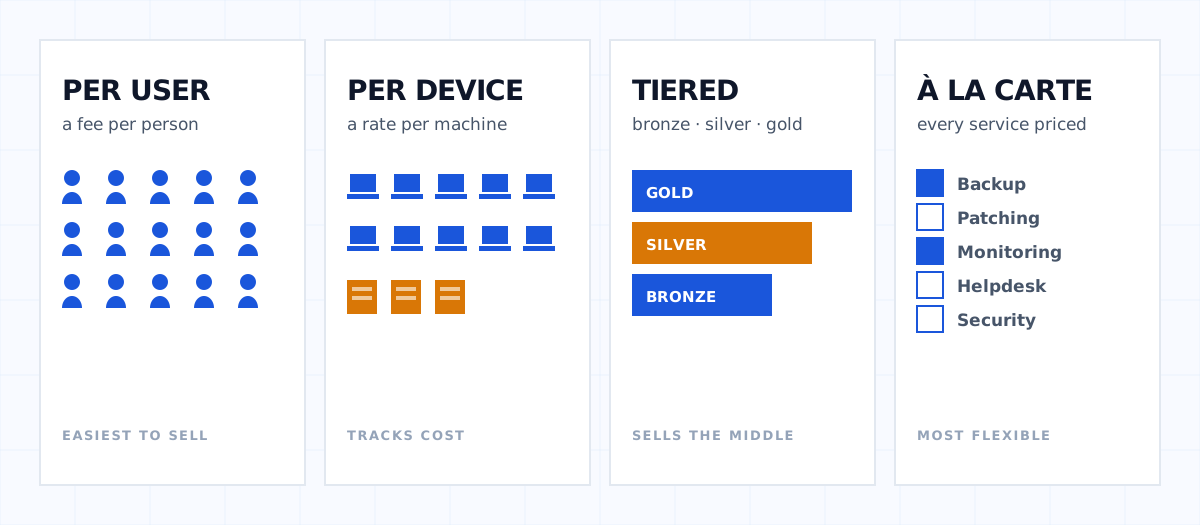
Quick answer. Most UK MSPs price managed services one of four ways: per user, per device, tiered packages, or à la carte. Per user is the most common and the easiest to sell; per device tracks cost more closely where server counts are high. Whichever you pick, the number that decides whether it works is not the headline rate — it is what the contract costs you to deliver, and most MSPs have never worked that out line by line.
Disclosure. BOBcloud publishes this article and sells a backup platform to MSPs. Backup is one line in an MSP's cost base, and we publish our rates, so we have used real figures where we have them. We have not invented numbers for anything else.
Pricing is the part of running an MSP that most people get to by instinct and then never revisit. A number gets set for the first customer, it becomes the number for the next one, and three years later nobody can explain why it is that and not something else.
This is a practical look at the models, what each one does to margin, and how to work out what a contract actually costs you.
The four pricing models
Per user
A flat monthly fee for every person supported, typically covering their workstation, mobile device, mailbox and a share of the shared infrastructure.
Why it wins. It is the easiest model for a client to understand and budget. Headcount is a number they already know, and it scales with their business in a way that feels fair. It also avoids the awkward conversation about whether a second laptop counts.
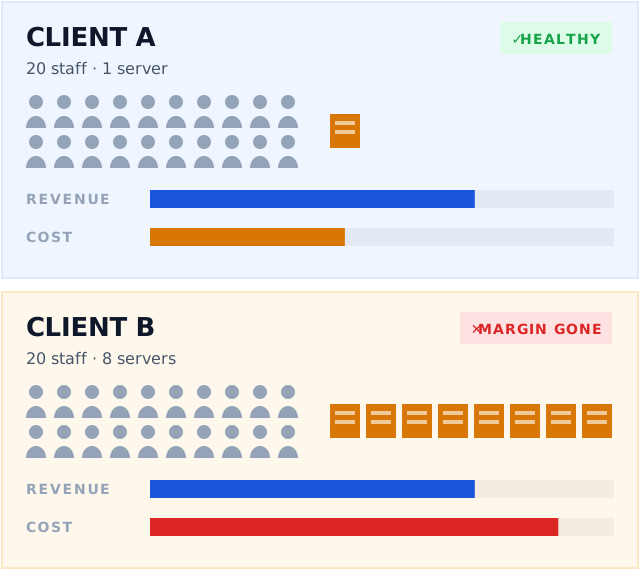
Where it hurts. A client with 20 staff and eight servers costs you far more to support than a client with 20 staff and one. Per-user pricing hides that until the margin report arrives.
Per device
A rate per workstation, a higher rate per server, sometimes separate rates for network kit.
Why it wins. It tracks your actual cost more closely, because devices are what generate tickets and what you buy licences for. Server-heavy clients pay what they cost.
Where it hurts. Clients dislike being charged for a laptop sitting in a cupboard, and you will spend time on device audits you would rather not. It also penalises you on clients consolidating onto fewer, bigger machines.
Tiered packages
Bronze, silver, gold, or whatever you call them. Each tier bundles a defined set of services at a fixed rate.
Why it wins. It sells. Three options is a proven way to move people toward the middle one, and it gives you a structured upgrade path rather than an awkward renegotiation.
Where it hurts. The tiers ossify. Something you added to gold two years ago is now table stakes in bronze and nobody has reworked the costs. Tiered pricing needs annual maintenance and rarely gets it.
À la carte
Every service priced separately. Backup, patching, monitoring, helpdesk, security — pick what you want.
Why it wins. Total transparency, and clients who only want two things do not subsidise those who want ten.
Where it hurts. It invites line-by-line negotiation at every renewal, it makes your revenue harder to forecast, and clients decline exactly the things they most need. Nobody has ever voluntarily added backup to a contract after declining it.
Most MSPs end up hybrid — a per-user or tiered base with security and backup as separately priced add-ons. That is usually the right answer, but only if you know what each add-on costs you.
What does an MSP actually charge?
Published UK figures are thin, because most MSPs treat pricing as commercially sensitive. What can be said with confidence is the shape rather than the number:
- Per-user rates cluster in a wide band depending on what is included — whether security, backup and licensing are in the base rate or bolted on makes more difference than the headline figure.
- Server rates run several times the workstation rate, reflecting both licence cost and ticket volume.
- Anyone quoting you a "typical UK MSP rate" without asking what is included in it is guessing.
The useful exercise is not benchmarking against other MSPs. It is working out your own cost to serve, which almost nobody does properly.
Working out your cost to serve
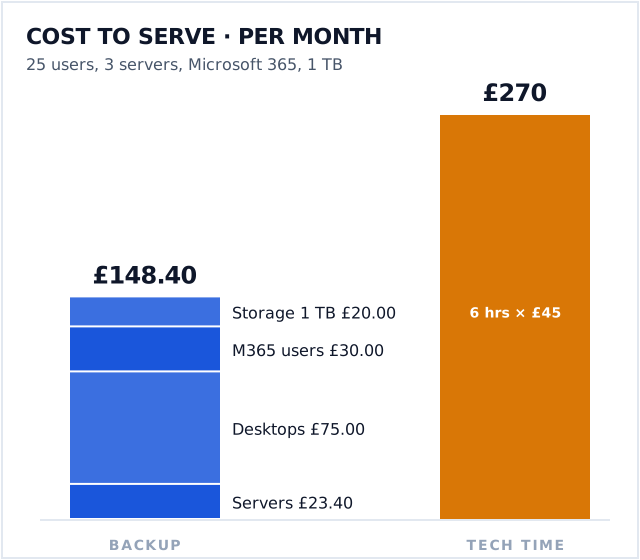
Take one real client and build it up. A 25-user business with three servers, on Microsoft 365, with about a terabyte of data:
| Cost line | Monthly |
|---|---|
| Backup — 3 servers × £7.80 | £23.40 |
| Backup — 25 desktops × £3.00 | £75.00 |
| Backup — 25 M365 users × £1.20 | £30.00 |
| Backup — 1 TB storage (Wasabi London) | £20.00 |
| Backup subtotal | £148.40 |
Those are our published wholesale rates, so they are real. The lines you need to add are the ones only you know:
- RMM and PSA licensing, per device or per technician
- Security stack — EDR, email filtering, DNS filtering, awareness training
- Microsoft licensing if you resell it
- Technician time, which is the big one and the one most MSPs guess at
That last line is where margin actually lives. If a 25-user client generates six hours of technician time a month and your loaded cost is £45 an hour, that is £270 — nearly double the entire backup bill. Tooling costs are visible and get optimised; labour costs are invisible and do not.
The test: take your three most profitable-feeling clients and your three most irritating-feeling ones, and work out the real figure for each. In our experience the ranking usually surprises people.
Where margin quietly disappears
Unbilled scope creep. The client who rings about a personal iPad. The "quick question" that takes forty minutes. Individually trivial, collectively a technician.
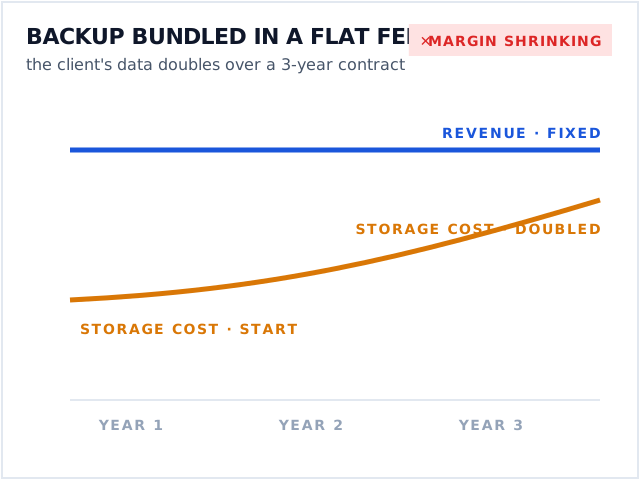
Storage growth on a fixed-fee contract. If backup is bundled into a flat per-user rate and the client's data doubles, your cost doubles and your revenue does not. This is the single most common margin leak we see, and it is why we meter storage on usage rather than bundling an allowance that eventually breaks.
Renewal increases you absorb. A vendor raises prices 15% at renewal, you decide not to pass it on this year, and it becomes permanent. Do that with three vendors and a chunk of your margin has gone without a single decision being made.
Per-feature add-ons discovered late. A platform quoted at a low base rate, with four modules you turn out to need. Establish this before signing, not at the first invoice.
Pricing backup specifically
Since it is the part we can speak to with numbers: backup is usually a small line in the cost base and a disproportionate share of the risk.
Two approaches work.
Bundle it and make it non-optional. Backup goes in the base rate, nobody declines it, and you never have the conversation where a client without backup loses data. The catch is storage growth — if you bundle, meter your own supplier or the maths breaks over a three-year contract.
Price it separately and visibly. It becomes a line the client can see and value, and it scales honestly with their estate. The catch is that some will decline it.
If you want to work your own numbers rather than read about ours, the MSP pricing calculator does the arithmetic above — cost to serve, then what to charge for a target margin, across all three models. Free, no signup, and there is a spreadsheet version if you would rather run it across your whole book.
Our own rates are published in full on the pricing page, and the backup cost calculator will model a specific client estate in a couple of minutes — no login, no quote call. If you want the per-workload detail, there are breakdowns for Microsoft 365, Google Workspace and VMware.
Putting a price up
The hardest part, and mostly a confidence problem rather than a commercial one.
Three things that make it easier:
- Do it annually, small, and by default. An expected modest increase lands better than a surprise large one every four years.
- Attach it to something. A vendor increase you are passing on, or a service you have added, gives the conversation a shape.
- Know your number first. If you have done the cost-to-serve exercise you can say what the margin is and why it needs to move. If you have not, you will fold at the first objection — and you should, because you are guessing.
The question worth asking about any pricing model
Not "what should I charge" — that depends on your market, your costs and your positioning, and anyone giving you a figure without knowing those is selling something.
Ask instead: what happens to this contract's margin if the client doubles their data, adds two servers, and their staff turnover is 30% this year?
If the model absorbs all three without a renegotiation, it is a good model. If any one of them quietly costs you money, you have found the thing to fix.