Incremental vs Differential Backup: What's the Difference?
Every backup strategy starts with a full backup: a complete copy of everything you've selected. Running a full backup every day is the simplest approach, but for most servers it isn't practical. It takes too long, uses too much bandwidth and fills storage quickly.
That's where incremental and differential backups come in. Both copy only the data that has changed, so they're much faster than a full backup. The difference is what they compare against, and that difference decides how much storage you use and how quickly you can restore.
The Three Backup Types at a Glance
| Backup type | What it copies | Compared against |
|---|---|---|
| Full | Everything selected | Nothing. It's a complete copy |
| Incremental | Data changed since the last backup of any type | The previous backup, full or incremental |
| Differential | Data changed since the last full backup | The last full backup only |
How Incremental Backup Works
An incremental backup copies only what has changed since the backup before it.
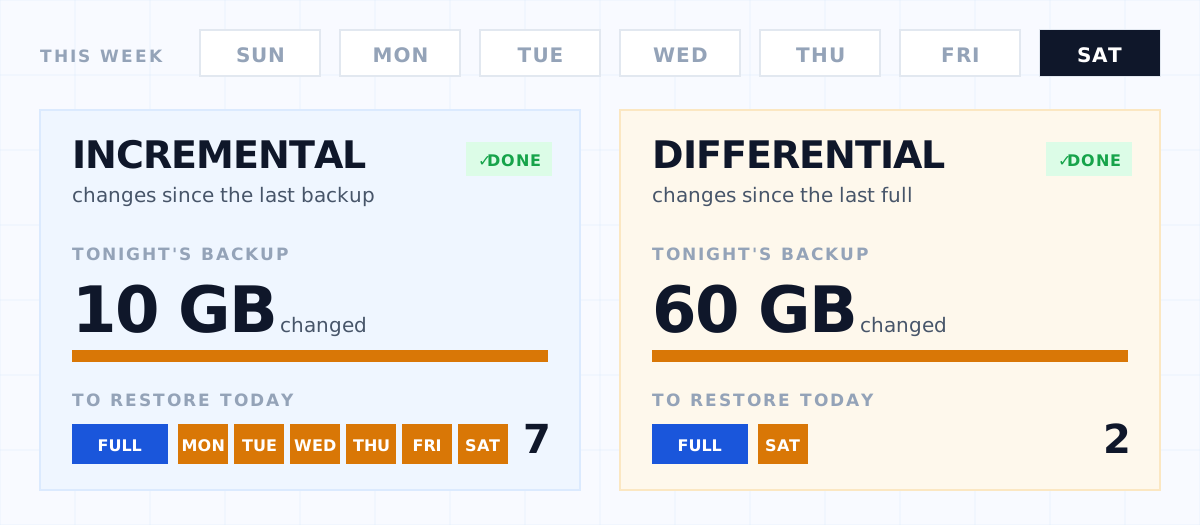
Say you run a full backup on Sunday. Monday's incremental copies Monday's changes. Tuesday's incremental copies only Tuesday's changes, and so on. Each backup is small, because it only ever holds one day's worth of changes.
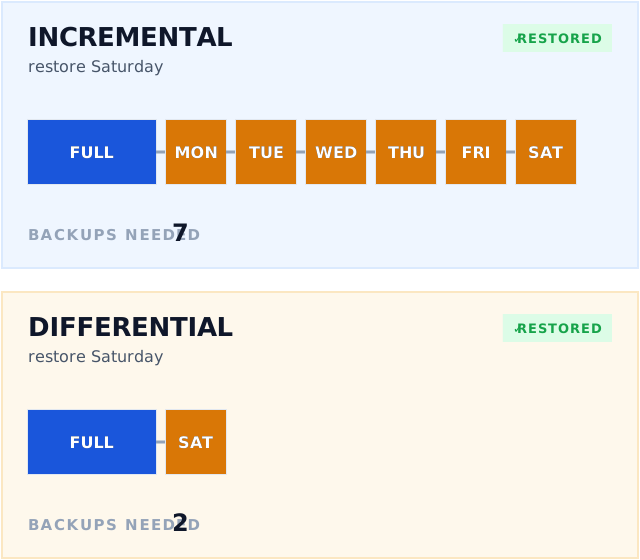
The catch comes at restore time. To get the server back to how it was on Friday, you need Sunday's full backup plus every incremental in between: Monday, Tuesday, Wednesday, Thursday and Friday. The backups form a chain, and every link in it has to be present and readable.
Strengths: fastest backups, least storage, least bandwidth. Weaknesses: restores depend on the whole chain, and a long chain can take longer to restore.
How Differential Backup Works
A differential backup copies everything that has changed since the last full backup, not since the last backup of any kind.
With the same Sunday full backup, Monday's differential holds Monday's changes. Tuesday's differential holds Monday's and Tuesday's changes. By Friday, the differential holds everything that has changed all week.
Restoring is simpler. To get back to Friday, you need just two things: Sunday's full backup and Friday's differential.
Strengths: quicker, simpler restores that only ever need two pieces. Weaknesses: each differential is bigger than the last, so backups slow down and use more storage until the next full backup resets the cycle.
A Worked Example
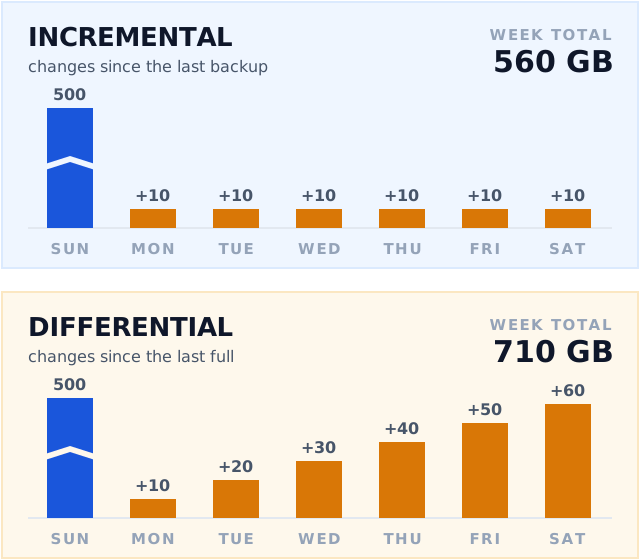
Take a file server with 500 GB of data, where around 10 GB changes each day. A full backup runs on Sunday, followed by a backup every weekday and on Saturday.
| Day | Incremental size | Differential size |
|---|---|---|
| Sunday (full) | 500 GB | 500 GB |
| Monday | 10 GB | 10 GB |
| Tuesday | 10 GB | 20 GB |
| Wednesday | 10 GB | 30 GB |
| Thursday | 10 GB | 40 GB |
| Friday | 10 GB | 50 GB |
| Saturday | 10 GB | 60 GB |
| Storage used for the week | 560 GB | 710 GB |
| Backups needed to restore Saturday | 7 (full + 6 incrementals) | 2 (full + Saturday's differential) |
In practice the gap is often smaller, because the same files tend to change day after day. A differential only stores the latest version of each changed file, so it doesn't grow quite as fast as the table suggests. The overall pattern holds, though: incremental saves storage, differential saves steps at restore time.
Side-by-Side Comparison
| Incremental | Differential | |
|---|---|---|
| Backup speed | Fastest, and stays consistent | Slows down as the week goes on |
| Storage used | Lowest | Higher, and grows until the next full |
| Bandwidth | Lowest | Higher |
| Restore speed | Slower with a long chain | Faster: full + one differential |
| Restore depends on | The full backup and every incremental since | The full backup and one differential |
| Risk if one backup is damaged | Restores after the damaged backup are affected | Only that day's restore point is affected |
Which Should You Choose?
Choose incremental when bandwidth and storage are the tightest constraints. That's typical of cloud backup over a business internet connection, or when you back up many devices to one storage destination. It's also the better fit when you want frequent backups through the day, because each one stays small.
Choose differential when restore speed matters most and you have storage to spare. A business that can't afford long downtime on a particular server, such as a line-of-business database, may prefer the shorter restore path.
For many businesses the answer is a mix: a full backup on a regular cycle (weekly or monthly), with incrementals in between to keep daily backups quick. Whichever you choose, set it against your recovery targets: how much data you can afford to lose, and how long you can afford to be down. We cover those targets in Backup and Disaster Recovery UK.
The Modern Approach: Changes Inside Files
Traditional incremental and differential backups work at the file level: if a file has changed, the whole file is copied again. That's fine for documents, but it's wasteful for large files that change a little every day, such as databases, mailbox stores, virtual machine disks and PST files. A 40 GB database with a few megabytes of new records would be uploaded in full every night.
Modern backup software, BOBcloud included, solves this by looking at the changes inside large files. Instead of re-uploading the whole file, it uploads only the parts of the file that have changed, called a delta. Those deltas can themselves be incremental (compared with the previous backup) or differential (compared with the last full copy of the file), and the software periodically uploads a fresh full copy so the chain doesn't grow forever.
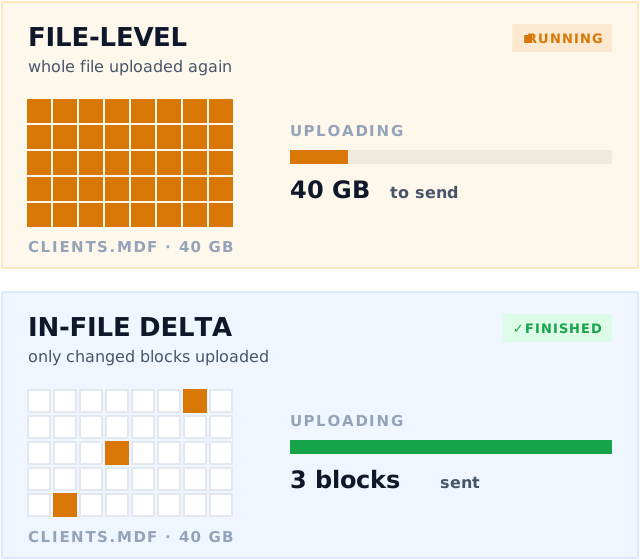
The result is the best of both: the bandwidth savings of incremental backup, without having to re-send large files every day.
Whatever You Choose, Test the Restore
A backup chain is only as good as your ability to restore from it. Run test restores regularly, from different points in the week, to confirm that every part of the chain is present and that you have the encryption password to hand. Keep at least one copy off-site, following the 3-2-1 backup rule, and consider immutable storage so ransomware can't delete or encrypt the backups you're relying on.
Summary
- Full backup: a complete copy. The foundation every other type builds on.
- Incremental: copies changes since the last backup. Smallest and fastest, but restores need the whole chain.
- Differential: copies changes since the last full backup. Grows over time, but restores need only two pieces.
- In-file delta: applies the same ideas inside large files, so only the changed parts are uploaded.
If you're an MSP or IT provider and want to see how BOBcloud handles full, incremental and in-file delta backups for your clients, get in touch.