Error
A scheduled backup of a network share or NAS (a UNC path) fails with one of these messages in the backup log:
- Backup source “\\xxx.xxx.xxx.xxx\folder” does not exist !
- Skip backing up “\\xxx.xxx.xxx.xxx\folder” (network drive is not accessible)
Manual backups of the same source usually work without any problem.
Cause
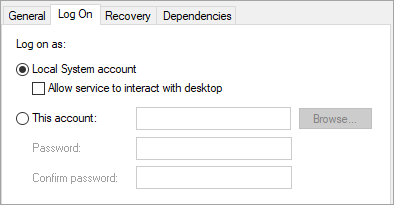
- The scheduler service can’t reach the network path. A manual backup runs with the logged-in Windows user’s permissions, so if that user can open the NAS, so can the backup. A scheduled backup runs under the backup scheduler service (Server Services or Desktop Services), which uses the built-in Local System account by default. Local System can reach local resources, but usually can’t reach NAS devices or other network shares unless the share grants access to the computer’s account in Active Directory. Mapped drive letters aren’t visible to it either.

- The backup source settings need reloading. The backup set’s source settings may be stale (for example, after the share path or credentials changed) and need to be reloaded.
Fix
- Run a manual backup while logged in as a user who can browse the network path and its contents. If that works, open the scheduler service’s properties (Server Services or Desktop Services) and, on the Log On tab, set it to run as that user, or another account with permission to access the network path, and enter its password. Restart the service.
- If the error continues, make a small change to the backup source selection or excluded folders and save the backup set, so the settings are re-read.
The next backup should run without the error.