Choose your alerts
Everyone on your account chooses their own alert emails. What you choose changes your inbox and nothing else: everyone sees the same portal.
Which emails
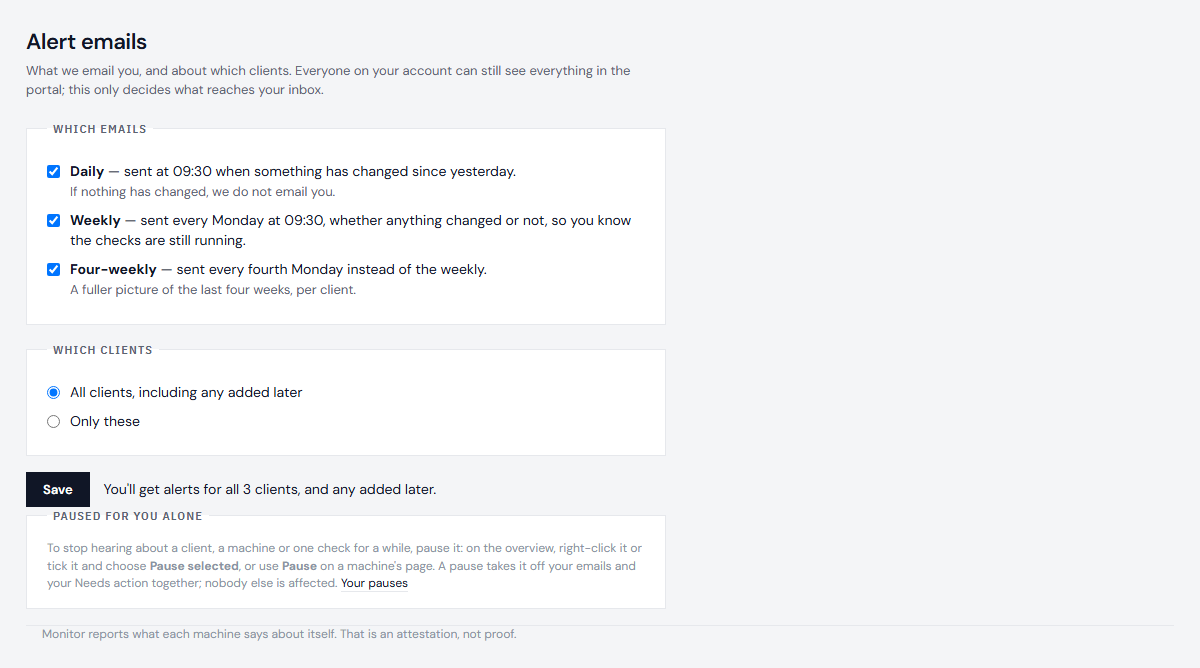
Open Account, then Alert emails.
- Daily - 09:30, only when something changed since yesterday.
- Weekly - every Monday at 09:30, whether or not anything changed, so you know the checks are still running.
- Four-weekly - every fourth Monday instead of the weekly: the last four weeks, client by client.
Which clients
All clients, including ones added later, or only the ones you choose. This is a standing choice about whose machines you look after, and it does not expire.
Pause a client, a machine or a check
A pause is yours alone: while it lasts you get no email about it, and it moves off your Needs action on the overview into Paused, greyed, with what it found and when the pause ends. It is never shown as healthy. Everyone else on your account still hears and still sees it, and evidence packs are unchanged.
- On the overview, right-click a client, a machine or a check and choose how long. Or tick several machines and choose Pause selected. On a machine's page, choose Pause beside a check, or Pause this machine.
- For 5 minutes, 15 minutes, 1 hour, 3 hours or 1 day; until a date and time; indefinitely; or a one-time maintenance window that starts later and ends by itself. Times are UK time. A reason is optional.
- Pausing something already paused replaces that pause.
Your Account page lists every pause - indefinite ones first - with Resume for each and Resume all. The weekly email always says how many pauses you have, so an indefinite one is never forgotten. To stop an alert for everyone, with a reason, an owner uses a silence instead.
Next: Build an evidence pack