Enable automatic updates
Automatic updates let the portal offer a newer probe to machines you choose, so you do not have to redeploy it through your RMM each time.
A probe recent enough to update itself takes the offer in its slot. Probes installed before automatic updates existed cannot update themselves: the Updates page says cannot update itself beside each one, and reinstalling it once is enough - later versions then follow on their own.
It works the same way for Windows and Linux machines. Each has its own releases: a Windows machine is only ever offered a Windows probe and a Linux machine a Linux one, and the top of Updates names the current version of each. A release that stops itself stops only for its own platform.
How it works
- Off unless an owner switches it on, for the whole estate, one client, or one machine. Every change is in the audit log.
- The machine asks; nothing is pushed. At its hourly check-in, the collector's answer says whether a newer probe exists for it. Nothing reaches into your clients' networks.
- Spread across a day. Switching on a whole estate does not update every machine in the same hour: each machine has its own slot within 24 hours. The platform can shorten this window for testing; when it has, the Updates page says so in red.
- A failing release stops itself. If machines report that they could not install a release, or that its signature did not check out, it is offered to no one.
- A machine that has never reported its version is offered nothing.
- Only a signed package is ever installed. The probe checks the release's signature against certificates it already trusts, on the machine, before it replaces anything. The connection is not what it trusts: a file changed anywhere on the way is refused.
- A failed update leaves the old probe running. A new probe that cannot pass its own self-test is taken out again and the previous one put back.
- Every attempt is reported. Beside each machine the Updates page shows its last attempt when it did not succeed: it could not download it, it refused it because the signature did not check out, it was not allowed to install it, or it rolled back. On the machine's own page, the result is the Update state check.
- An update never changes where a machine reports to, its credentials or its scheduled task.
- Security software may need telling. An update replaces the probe's own files and starts a self-test; see What to tell your EDR.
Switch it on
Open Updates. Under Automatic updates, choose the whole estate, a client or a machine, and choose Switch on. Only an owner can switch it on or off.
Update through your RMM instead
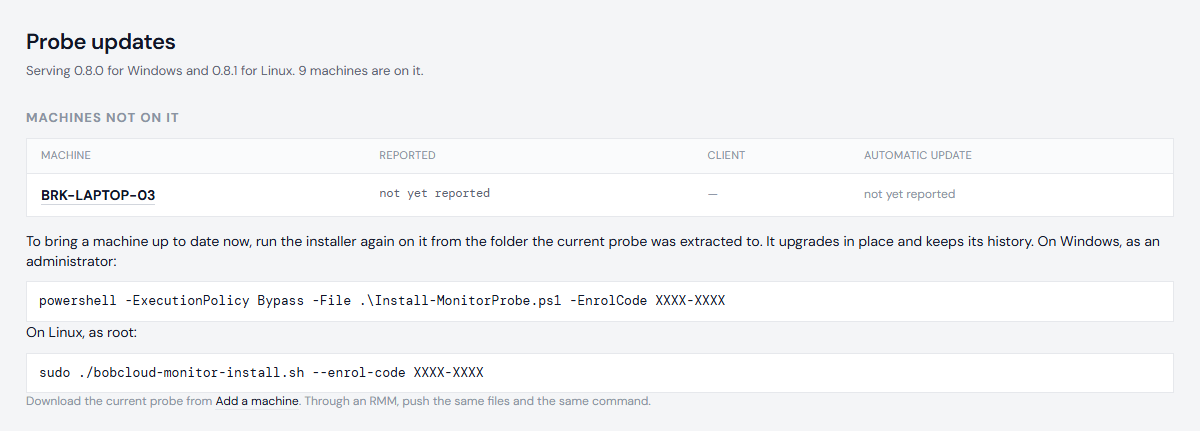
The top of Updates lists every machine not on the current probe, with the command to run on each. Running the installer again updates it in place - see Install the probe.
Who can do what: see Logins and roles.
Next: Read the checks