Approve a machine
A newly installed probe does not start reporting on its own. It asks to join, and a person on your account decides.
A machine installed again after it was approved keeps its approval - the installer says APPROVED - and does not wait here again. This is deliberate: an enrolment code that leaks gets someone a waiting request and nothing more.
Approve or reject
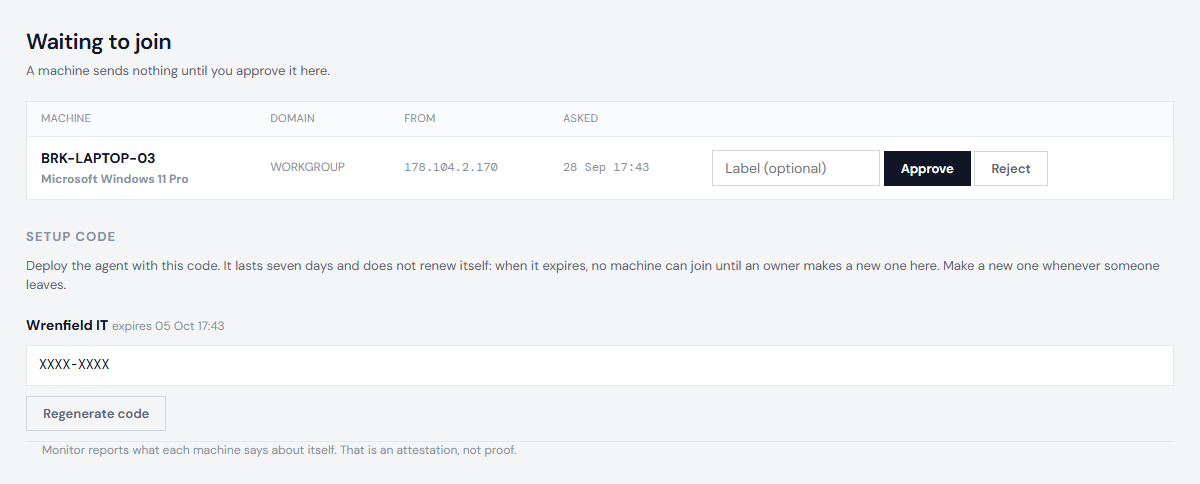
- Open Waiting. Each machine that has asked to join is listed with its name and Windows version.
- Choose Approve for the machines you installed. They start reporting at their next hourly check-in. To give a machine a name you will recognise - "Reception PC" - type it in the label box beside Approve first.
- Choose Reject for anything you do not recognise. A rejected machine is refused from then on.
Anyone on your account can approve or reject.
Label a machine
A label is your name for a machine. The portal shows it everywhere with the machine's own name beside it, and evidence packs show both. The machine itself is not changed: its probe still reports its real name, and if that changes, the new name is shown and your label stays.
- Give one when you approve the machine, or later: open the machine and use the Label box at the top. Save an empty box to remove it.
- Each label can be used once in your account. If another machine already has it, the portal says which one and changes nothing.
- Up to 64 characters: letters, numbers, spaces and ordinary punctuation.
- To find a machine, search on Devices by its label or its name.
Anyone on your account can set or change a label, and the audit log records each change.
If a machine does not appear
- Give it up to an hour after the install.
- Check the install command ran as an administrator and finished without an error.
- Check your enrolment code has not expired. Add a machine shows when it does. An owner can make a new one on Waiting; the old one stops working at once.
- If it still does not appear, see When a probe stops reporting.
Revoke a machine
When a machine is sold, stolen or taken out of service, open it and choose Revoke this machine. Its probe is refused from then on. Its history stays, so evidence packs for the time it was yours are unchanged.
Who can do what: see Logins and roles.
Next: Enable automatic updates