Add a client
Clients are how you group your customers' machines. Each machine belongs to one client, or to none yet.
Evidence packs, alert emails and the overview are all organised by client.
Add one
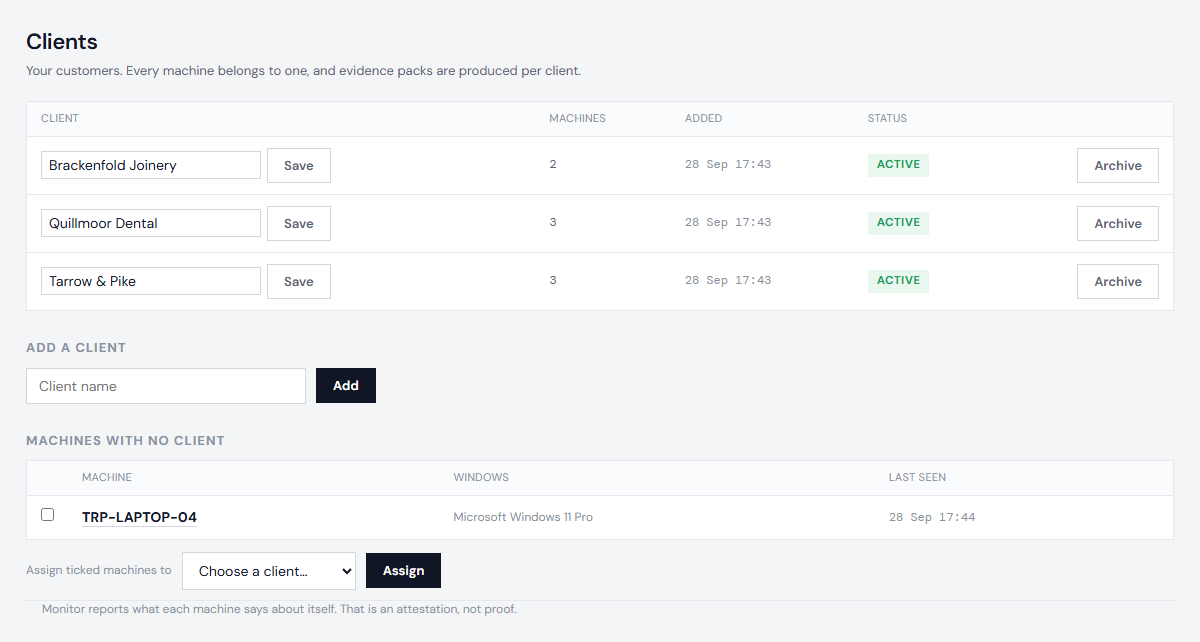
Open Clients, type the client's name and choose Add. Anyone on your account can add a client or rename one. Whoever adds a client is sent alerts about it.
Put machines in it
Only an owner can move machines between clients, because which client a machine belongs to decides whose evidence pack it appears in.
- Several at once: on Clients, tick the unassigned machines, pick the client and choose Assign.
- One at a time: open the machine and choose its client under Client.
A machine keeps its history when it moves. Evidence packs show which client it belonged to on which dates.
Archive one
An owner can archive a client that is no longer yours. It stops appearing in lists and pickers; its machines keep their history and stay assigned, so older evidence packs are unchanged. An owner can restore it later.
Who can do what: see Logins and roles.
Next: Install the probe