Read the checks
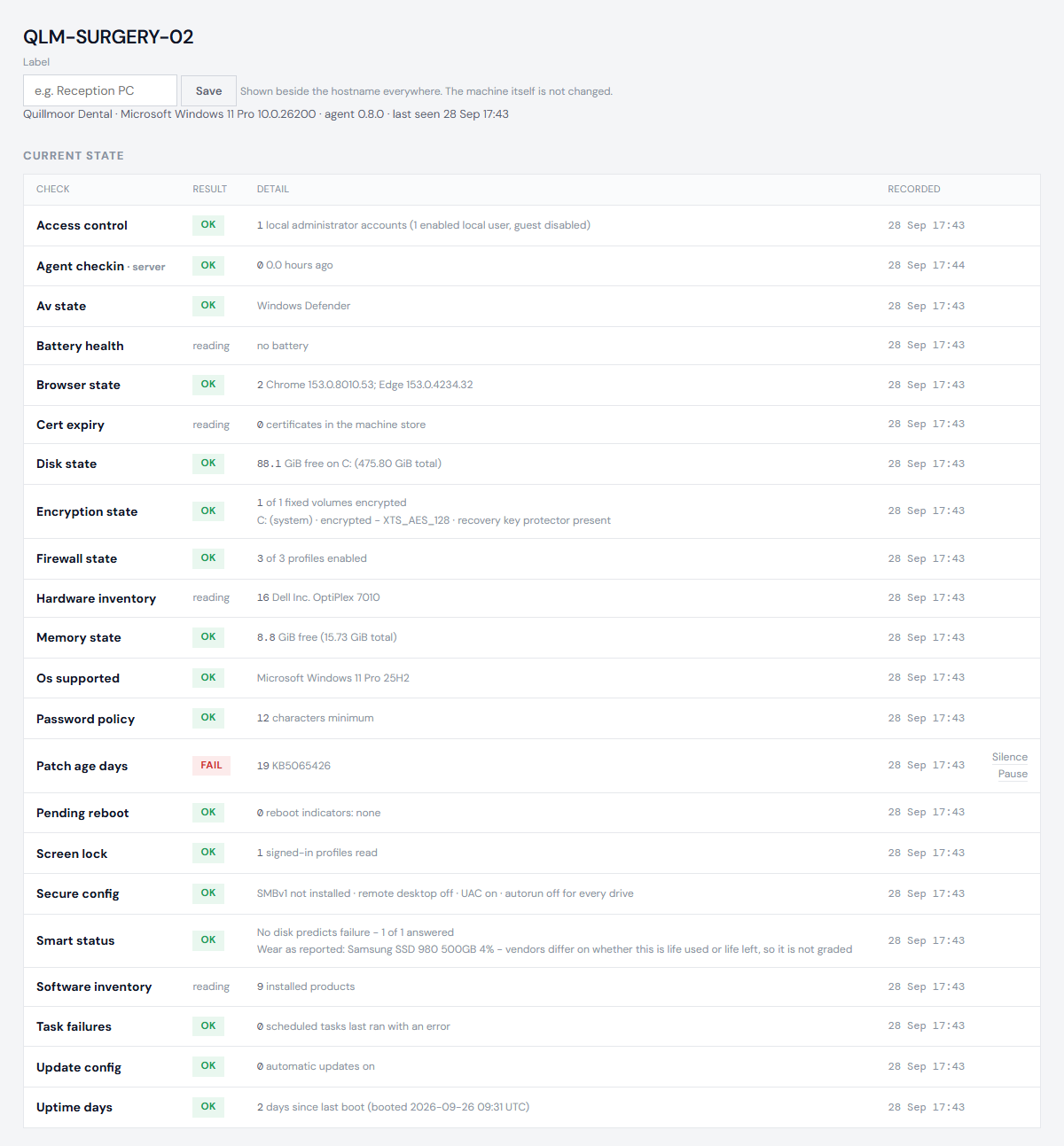
Every hour each probe reports what it finds. The portal decides what each reading means, so a change in the rules applies to every machine at once, without touching them.
The headline: how old are the missing updates
Updates, in days is the age of the oldest critical or important Windows update the machine has not installed. Cyber Essentials allows 14 days. The overview shows every machine on that 14-day scale.
A machine that takes its updates from WSUS is measured against what your WSUS has approved for it, not against everything Microsoft has released.
What each result means
| Result | Meaning |
|---|---|
| ok | The reading meets the rule. |
| warn | Close to a limit, or worth a look. Nothing has failed yet. |
| fail | The reading does not meet the rule. It appears under Needs action. |
| unknown | The machine could not read this, so nothing was decided. Unknown is never counted as a pass. |
| reading | Information with no verdict - hardware, installed software. |
An unknown says why on the machine's page, when the probe said:
- Timed out on the machine after N seconds - the check took longer than the probe allows it, so the probe stopped waiting and sent the rest of its checks. On patch age this usually means Windows Update is busy or stuck on that machine; it clears on its own when Windows Update does, or after a restart.
- Could not be read on the machine - Windows refused or failed to give the value, for example because a component is missing or access was denied.
One slow or stuck part of Windows never stops a machine reporting everything else.
Some checks read several settings. Where the probe could read some of them and not others, the check shows what it read and adds a line, Could not be read on the machine:, naming the rest. It is then at least a warn, never a pass: a pass on half a reading would claim more than anyone knows. A setting that is simply not configured is different - it says not set (Windows default), because the default is a real answer.
Controls are the settings Cyber Essentials looks at: updates, antivirus, firewall, supported Windows, encryption, accounts, screen lock and similar. They can fail. Health readings - disk space, disk health, certificates, failing scheduled tasks - can warn but never fail, because a full disk is not a missed control.
The overview
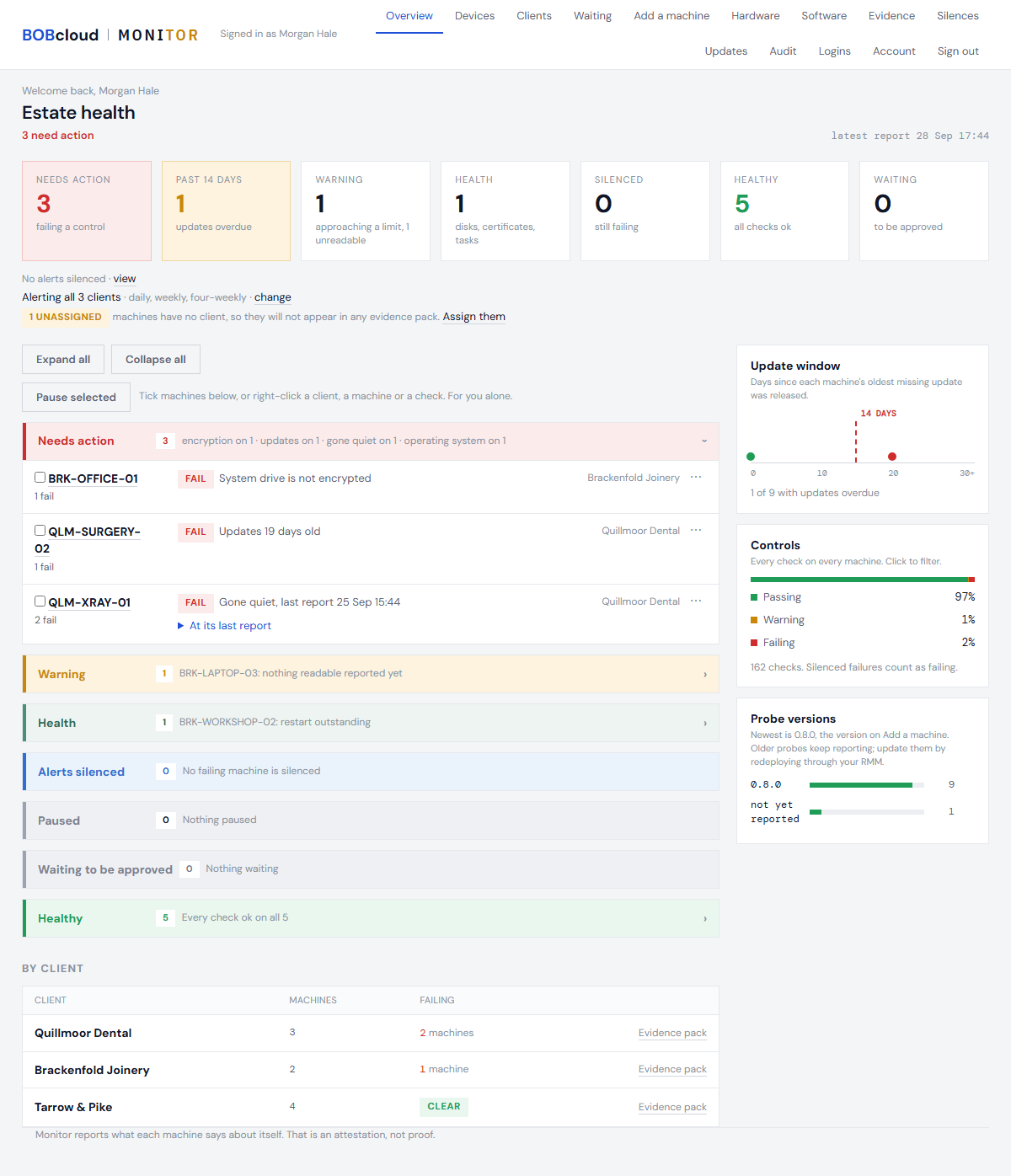
Machines are grouped by what needs doing: Needs action, Warning, Health, Alerts silenced, Paused, Waiting, Healthy. A machine that has reported but has not yet had any check graded sits under Warning, not Healthy - reporting in is not the same as passing.
In Needs action, Warning, Alerts silenced and Paused, each machine is one short block:
- its name, and a count of what it found - for example "5 fail · 3 warn · 1 unknown";
- each failure, one line each;
- warnings and checks that could not be read behind one line, "+3 warnings, 1 unknown". Open it to see them. Checks that could not be read are always counted there, never left out.
A machine that has gone quiet shows one line, "Gone quiet, last report" and the time. What it said at that report is behind At its last report - what it said then, not what is true now.
The most failures come first, then machines that have gone quiet, then those with warnings only; machines with the same are in name order. Expand all opens every block's hidden lines and Collapse all closes them; the portal remembers your choice. The menu on each block pauses the machine for you, and lets an owner silence it.
Days are whole days everywhere: an update 751 days old, not 751.2. When antivirus fails, the line says what the machine reported - real-time protection off, or definitions a number of days old, or out of date. If the reading does not say which, it says "Antivirus reported a problem it didn't name"; the portal never guesses.
On Linux
A Linux machine is judged on the same controls, read the Linux way. Its page describes each reading in Linux terms.
Updates: the Linux number is the age, in days, of the oldest security update waiting on the machine - judged by the same 14 days as Windows. Ubuntu and Debian do not record on the machine when an update was released, so the portal dates each one itself, from Ubuntu's security notices and Debian's security announcements, which it collects daily. The machine's page names the oldest: which package, which notice, released when. An update that no notice dates is named as not dated by any notice, and makes the reading unknown unless something already fails - never a pass. A probe from before this counts the waiting security updates instead, and any at all is a warn.
| Check | What the Linux probe reads | What fails it |
|---|---|---|
| Antivirus | ClamAV, Microsoft Defender for Endpoint, CrowdStrike Falcon, SentinelOne, Sophos: running, real-time protection, definitions age | none found; not running; real-time protection off; definitions too old |
| Firewall | ufw; the nftables and iptables rules on incoming traffic | nothing filtering incoming traffic. Rules that still let everything else in are a warn |
| Updates allowed | the apt timers that fetch and install updates; unattended upgrades | both apt timers switched off. Unattended upgrades off is shown, not judged: your own tools may do the patching |
| Encryption | whether / and each data disk sit on an encrypted (LUKS) device | / not encrypted. A data disk not encrypted is a warn |
| Secure configuration | ssh's own settings, accounts with an empty password (counted, never named), system folders anyone can write to | an empty password, or ssh accepting one. Root allowed to log in over ssh, or an open system folder, is a warn |
| Accounts | how many are in the sudo, admin and wheel groups; sudo rules that need no password; accounts with UID 0 besides root (counted, never named) | another account with UID 0. Many admins, or a passwordless sudo rule, is a warn |
| Password policy | the minimum length PAM enforces (pam_pwquality or pam_unix, with their own defaults) and pam_faillock's lockout | shorter than 8. No lockout is a warn |
| Screen lock | whether there is a desktop at all; on a desktop, the system-wide lock settings | lock switched off. Longer than 15 minutes is a warn |
| Failing tasks | systemd units that have failed, by name | health: a warn, never a fail |
A Linux machine with no antivirus at all fails, and its page says so: No antivirus found. Cyber Essentials also accepts application allow-listing; if this machine is protected that way, silence this check with the reason. The probe cannot see allow-listing, so it never assumes it; the silence records that it was a decision, and the failure still shows in the portal and in evidence packs. Many Linux servers run no antivirus: where your Windows estate's EDR (Defender for Endpoint, CrowdStrike, SentinelOne, Sophos) has a Linux agent, installing it is often the simplest answer, and the probe will see it.
Some checks do not apply to every machine, and say so as not applicable with the reason, never as a pass:
- screen lock, on a machine with no graphical session - a server;
- certificates: no machine certificate store on Linux;
- disk health, on virtual disks only;
- battery, with no battery.
On a desktop whose lock is set by each user rather than system-wide, screen lock is unknown: the lock is set per user, which the probe does not read.
What a result is, and is not
The machine belongs to someone else, so what it reports is an attestation, not proof. Someone with administrator rights on it could make it report something untrue. Every product of this kind shares that limit. What the portal gives you is continuous monitoring and a record of it, which is useful evidence; it cannot verify that a machine is set up as it says.